Integrating Kling 3.0 Into a Production Render Queue
A working pattern for running Kling 3.0 behind a job queue: async submission, status polling, retries for the fluid and fire fail case, cost tracking per job, and pre-flight prompt validation.
You probably did not start with a queue. The first shots went through fal.subscribe on a laptop, the team loved them, and now marketing wants 400 renders a week. Here is the pattern we use to move Kling 3.0 from notebook experiments to a production queue that handles retries, tracks spend per job, and fails loud when the prompt was bad before you ever called the API.
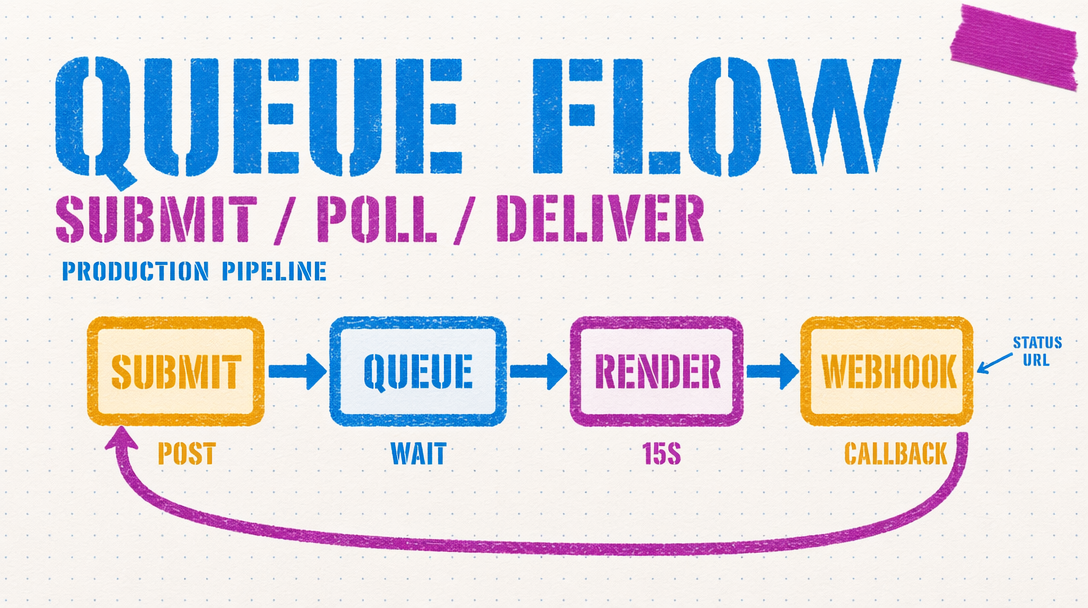
Five jobs the queue has to do
Submit the request and walk away. Poll for status without hammering the endpoint. Retry the ones that fail in a recoverable way, which for Kling is mostly the fluid and fire sim fail. Track cost per job in dollars. And run a pre-flight check on every prompt before submission so you stop paying for prompts that were never going to make it past the content filter.
Async submit plus poll
Kling 3.0 runs on the fal queue. A v3 Pro render at 10 seconds can take a minute or more. Blocking the request thread for that is a bad idea. Use the async path.
1import { fal } from "@fal-ai/client";23fal.config({ credentials: process.env.FAL_KEY });45async function renderShot(prompt, duration = 5) {6 const submitted = await fal.queue.submit(7 "fal-ai/kling-video/v3/pro/text-to-video",8 {9 input: { prompt, duration, cfg_scale: 0.5, aspect_ratio: "16:9" },10 webhookUrl: "https://your-app.com/hooks/kling"11 }12 );13 const requestId = submitted.request_id;14 let attempts = 0;15 while (attempts < 180) {16 const status = await fal.queue.status(17 "fal-ai/kling-video/v3/pro/text-to-video",18 { requestId, logs: true }19 );20 if (status.status === "COMPLETED") {21 const result = await fal.queue.result(22 "fal-ai/kling-video/v3/pro/text-to-video",23 { requestId }24 );25 return { ok: true, url: result.data.video.url, requestId };26 }27 if (status.status === "FAILED") {28 return { ok: false, reason: status.logs, requestId };29 }30 await new Promise(r => setTimeout(r, 5000));31 attempts++;32 }33 return { ok: false, reason: "timeout", requestId };34}
Notice the webhook URL on submit. If you have an HTTP endpoint that can accept the callback, you can skip polling and let fal tell you when the job is done. Most teams stand up the poll loop first and move to webhooks later.
Retry patterns
Not every failure is worth retrying. Content filter fails are final: rewrite the prompt or skip. The interesting case is the fluid and fire sim fail, where the render comes back but the motion is visibly wrong. For that class you want a retry with a modified prompt.
The rule that works: on the first failure, drop cfg_scale by 0.1 and rerun. On the second, switch from Pro to Standard at 720p to confirm the prompt is the issue, not the resolution. On the third, flag for human review. Do not loop on the same call more than once. Retrying the same prompt at the same seed gives you the same artifact.
Cost tracking per job
Write into your job record: duration, audio flag, tier, and computed dollar cost. v3 Pro is $0.112 per second without audio and $0.168 per second with audio on. A 10 second Pro render with audio is $1.68. Multiply by your retry count. Log the running total per project so you can pull a cost report without spelunking in billing dashboards.
The trap is tracking credits instead of dollars. Credits make it impossible for a producer to say "this campaign spent X." Store the dollar amount at submission time.
Pre-flight validation
The cheapest render is the one you never submit. Run every prompt through a local validator first.
Text overlay detection. Kling 3.0 warps small text, so flag any prompt asking for legible text on a product or sign. Strip phrases like "text reads," "label says," or "sign that says."
Crowded scene detection. Prompts with more than four distinct subjects degrade. Count nouns describing people, animals, or objects. Over four, warn the submitter.
Fine motor glitch triggers. Hands holding small objects, fingers on keyboards, precise tool use. Not blocked, but worth a warning banner.
What to monitor
First pass success rate, average retry count, cost per accepted shot. If first pass drops below 70 percent, audit your prompt library. If retry count climbs above 1.4, pre-flight is missing cases.