Prompting Kling: Multi-Shot Storyboards That Hold Together
The new multi-shot field lets you chain up to 6 shots per call. Here is how to write them so the subject, tone, and continuity hold across the cut.
Multi-shot is the one feature in Kling 3.0 that changes your production pipeline. Before 3.0 you ran three API calls, stitched in a timeline, and prayed the model picked the same face twice. Now you pass a shots array with up to six entries and the model carries identity across cuts inside one render. The catch: if you prompt the shots like you used to prompt standalone clips, continuity falls apart by shot three. Here is how to write them so the story actually holds.
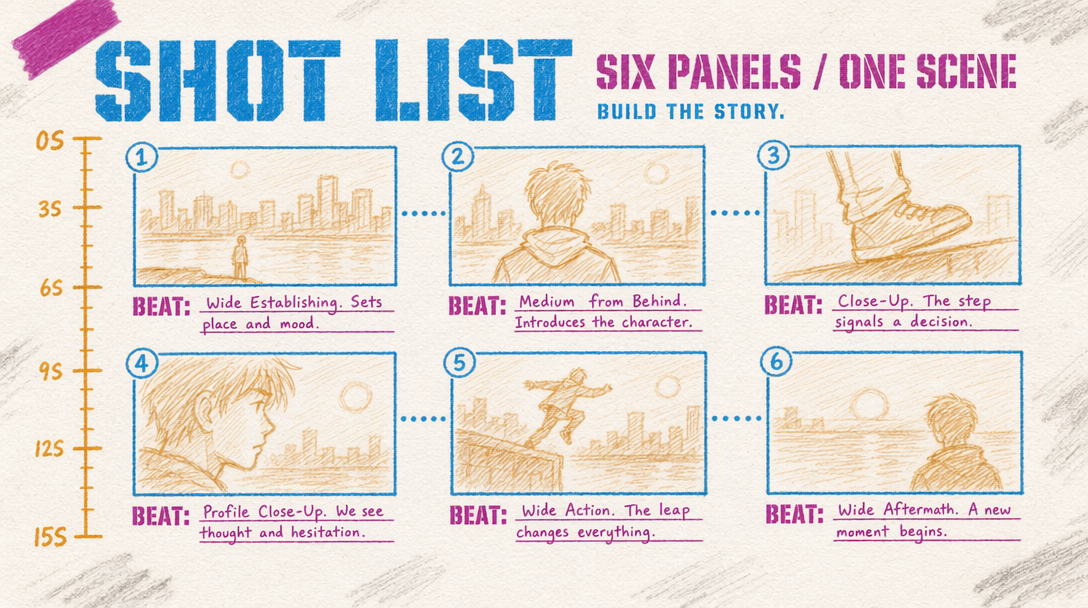
The shot shape
Each shot entry accepts five fields you care about: prompt, duration, size, perspective, and camera. The first one is obvious. The other four are where continuity lives.
durationis per shot. Sum of all shot durations cannot exceed 15 seconds. Six shots at 2.5 seconds each works. Three shots at five seconds each works. Mixing is fine.sizecontrols framing intent. Use values likewide,medium,close,extreme close. Switching from close to wide between shot 2 and 3 reads as a cut. Staying on medium for all six reads as a tracking montage.perspectivecontrols eye level.eye level,high angle,low angle,top down. Do not flip perspective every shot unless you want a music-video feel.camerais the actual motion:static,dolly in,pan left,arc right,crane up. This is where amateurs over-direct. Two of six shots with motion is usually enough.
shot_type: intelligent vs customize
This is the single most important decision you make when writing shots. intelligent hands the shot planning to Kling, you just give an overall prompt and a count. The model chooses the cuts, durations, and camera moves. It is fine for generic b-roll, it is bad for anything where you care about what happens at second 7.
customize is what you want whenever the story matters. You write every shot explicitly. The model follows your order. Subject persistence is stronger in customize mode because you are stating the subject in each shot prompt, which reinforces identity across the cuts.
1import { fal } from "@fal-ai/client";23fal.config({ credentials: process.env.FAL_KEY });45const result = await fal.subscribe("fal-ai/kling-video/v3/pro/text-to-video", {6 input: {7 shot_type: "customize",8 shots: [9 { prompt: "a baker kneads dough on a floured counter, warm morning light", duration: 3, size: "medium", perspective: "eye level", camera: "static" },10 { prompt: "the same baker slides the loaf into a stone oven", duration: 2, size: "close", perspective: "eye level", camera: "dolly in" },11 { prompt: "the loaf crust golden, steam rising in the oven interior", duration: 2, size: "extreme close", perspective: "eye level", camera: "static" },12 { prompt: "the baker carries the finished loaf to a wooden table, customers in soft focus behind", duration: 3, size: "wide", perspective: "eye level", camera: "arc right" }13 ],14 aspect_ratio: "16:9",15 cfg_scale: 0.5,16 audio_enabled: true,17 audio_language: "en",18 negative_prompt: "blur, distort, and low quality"19 },20 logs: true21});2223console.log(result.data.video.url);
Continuity tricks that actually work
Two things you do in every shot prompt to hold the subject across cuts.
- Restate the subject with a consistent descriptor. "The baker" or "the same baker" in every shot. If you switch to "a person" in shot 3, expect a different face.
- Keep the lighting language consistent. "Warm morning light" in shot 1 and "bright diffused light" in shot 2 reads as a time jump to the model, which it will try to render. Use "warm morning light" in every shot if you want the scene unified.
What to never do
- Do not exceed 15 seconds across shots. The call silently truncates the last shot.
- Do not use six shots for a five second total. One second shots feel like whiplash, the cut happens before the motion reads.
- Do not mix aspect ratios across shots. There is one
aspect_ratioper call. - Do not over-direct camera motion. Two moves across six shots is plenty.
The 4-shot example above runs 10 seconds total on v3 Pro with audio on. Math: 10 x $0.168 = $1.68 per render. Budget two to three retries at that price while you dial in the shot list.